About Arduino Mega 2560 - Compatible
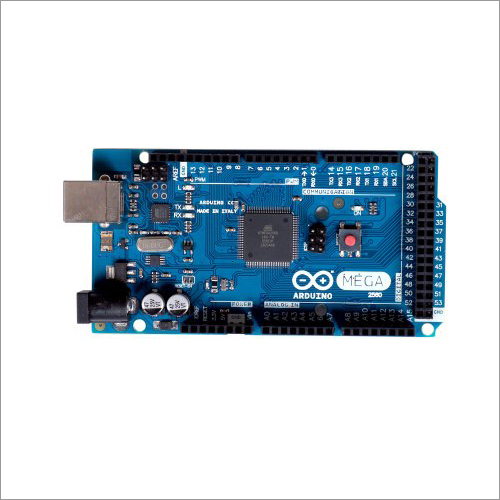
The MEGA 2560 is designed for more complex projects. With 54 digital I/O pins, 16 analog inputs and a larger space for your sketch it is the recommended board for 3D printers and robotics projects. This gives your projects plenty of room and opportunities.
BrandArduino
Model No.Mega 2560
MicrocontrollerATmega2560
Operating Voltage5V
Input Voltage (recommended)7-12V
Input Voltage (limit)6-20V
Digital I/O pins54 (of which 15 provide PWM output)
Analog Input Pins16
Length101.52 mm
Width53.3 mm
Weight37 gm
DC Current per I/O Pin20 mA
DC Current for 3.3V Pin50 mA
Flash Memory256 KB of which 8 KB used by bootloader
SRAM8 KB
EEPROM4 KB
Clock Speed16 MHz
Designed for Advanced ProjectsThe Arduino Mega 2560 is engineered to meet the needs of demanding projects requiring more I/O pins and memory. Its ATmega2560 microcontroller enables the development of sophisticated applications, making it a preferred choice in education, research, and professional engineering.
Versatile Connectivity OptionsWith four hardware UARTs, support for I2C, SPI, and a USB type-B interface, the board facilitates diverse communication protocols. This makes integration with sensors, modules, and other devices seamless for rapid prototyping and development.
Robust and Reliable OperationManufactured using FR4 fiberglass PCB and operating across a broad temperature range, the Arduino Mega 2560 is well-suited for varied physical environments. Its through-hole mounting also allows for secure installation in both temporary setups and permanent installations.
FAQ's of Arduino Mega 2560 - Compatible:
Q: How do I power the Arduino Mega 2560 board?
A: You can power the Arduino Mega 2560 using either the USB Type-B port (5V) or an external DC supply between 7-12V. The absolute input voltage limits are 6-20V, but operating within the recommended range ensures optimal stability.
Q: What are the main advantages of using the Arduino Mega 2560 over other Arduino boards?
A: The Mega 2560 offers a higher number of digital and analog pins (54 and 16, respectively), four hardware serial ports (UARTs), and greater memory resources compared to standard models. These features make it suitable for large-scale, complex, and multi-device projects.
Q: Where can I use this board in my projects?
A: You can utilize the Arduino Mega 2560 in electric devices, embedded systems, robotics, automation, and prototyping. Its compatibility with shields and modules makes it highly adaptive for educational, industrial, or hobbyist applications.
Q: What process should I follow to upload a program to the Arduino Mega 2560?
A: Connect the board to your computer via the USB Type-B interface, open the Arduino IDE, select 'Arduino Mega 2560' as the board type, choose the correct COM port, and upload your code directly to the board.
Q: When should I choose the Mega 2560 for my development requirements?
A: Select the Mega 2560 when your project demands more I/O pins, additional hardware serial ports, or extensive memory. It's ideal for projects involving multiple sensors, complex control systems, or parallel communication tasks.
Q: How does the onboard USB to serial converter work?
A: The board uses the ATmega16U2 microcontroller as a USB-to-serial converter, allowing seamless communication between your computer and the ATmega2560 for programming and serial monitoring.

 Send Inquiry



 Send Inquiry

 Send Inquiry

